A great video intro maker for youtube can totally level up your channel. It's the secret sauce that takes a normal video and gives it that professional vibe right from the start. Think of it as your channel's handshake—it’s how you make a killer first impression that hooks viewers in seconds.
Why a Great Intro Matters for Your YouTube Channel
Your YouTube intro is way more than just a cool animation with music. It’s like the welcome mat for your channel. For most new viewers, it's the very first thing they'll see from you. And we all know that in the online world, first impressions are everything. A sharp, well-made intro instantly tells people you're serious about your content, which makes them trust you right away.
Imagine this: you're looking up videos for a new hobby. You click on two different ones. The first one just jumps right into the action with a shaky camera. The second one starts with a clean, snappy 5-second intro showing the channel's logo and name. Which one feels more legit and worth your time? It's the second one, almost every time.
Building Your Brand Identity
Using the same intro in all your videos is a smart branding move. It creates a familiar vibe that makes your subscribers feel right at home. It’s that little jingle or visual that tells them, "Yep, you're in the right place." This consistency helps you stand out in a sea of other creators and makes your videos instantly recognizable.
Here’s what a great intro really does for you:
- Reinforces Your Vibe: Your intro sets the mood. Is your channel super energetic and fun? Or is it calm and educational? The music, colors, and animation style all work together to show off your channel's personality before you even say a word.
- Boosts Viewer Retention: A punchy, exciting intro can actually keep people watching longer. A good opener can increase how long people watch by up to 20% in those first critical 10 seconds. It gets your audience hyped for what's coming and makes them want to stick around.
- Looks Professional: It’s a clear sign that you put real effort into your work. This small detail makes your whole channel look less like a hobby and more like the real deal.
Here’s a quick look at the real perks a pro YouTube intro brings to your channel.
| Benefit | Impact on Your Channel |
|---|---|
| Brand Recognition | Makes your content instantly stand out in feeds and suggestions. |
| Viewer Trust | A polished look makes you seem more credible and suggests your content is top-notch. |
| Audience Engagement | A cool intro hooks viewers, stopping them from clicking away immediately. |
| Content Consistency | Creates a smooth, professional feel across all your videos. |
Basically, a good intro ties everything together, creating a cool and memorable experience for your audience.
Standing Out in a Competitive Space
The need for a quality video intro maker for youtube has blown up because, well, everyone is on YouTube. With over 2.7 billion people using it every month, it's a super crowded place. A unique intro helps you create your own identity and stand out from the crowd.
Your intro isn't just an extra thing; it's a powerful tool. It’s like a short, awesome commercial for your brand that plays at the start of every single video you make.
Seeing your intro as a smart investment is the first step toward building a stronger, more popular channel. If you're wondering where to even start, our guide on how to make a video intro breaks down the whole process for you.
First Things First: Planning Your Perfect YouTube Intro
Jumping straight into a video intro maker for youtube without a plan is a classic mistake. It's like trying to build furniture from IKEA without looking at the instructions. You might end up with something, but it probably won't be the awesome thing you imagined. A few minutes of planning now will save you hours of headaches later and make sure your intro really fits your channel's personality.
Think of this as making a quick sketch. It doesn't have to be perfect. Just making a few key decisions now will be the difference between a boring, generic intro and a signature opening that gets viewers excited.
Define Your Intro's Main Goal
Before you even think about software, ask yourself one big question: What is this intro supposed to do? Your answer will guide every other choice you make. An intro isn't just a cool animation; it has a job.
Is your main goal to:
- Showcase Your Logo? If making your brand famous is your top priority, a clean, punchy logo reveal is the way to go. It’s professional, direct, and drills your brand into the viewer's memory.
- Set a Specific Mood? Maybe you have a channel with chill art tutorials. Your intro should match that vibe with slower animations and calming music. On the other hand, a high-energy gaming channel needs something fast, loud, and exciting to get people hyped.
- Introduce a Series? If you have regular shows like "Tech Tuesdays" or "Makeup Mondays," making a special intro for that series instantly tells viewers what they're about to watch.
Having a clear goal stops you from getting distracted by flashy effects that don't really do anything. This is also a great time to figure out your channel's visual style, which includes choosing a distinct logo for your YouTube channel that will probably be the star of your intro.
Find the Sweet Spot for Length
Let's be real: people online have super short attention spans. It’s tempting to create a long, epic intro, but you have to fight that urge. When it comes to YouTube intros, short and sweet is always better.
The sweet spot for a YouTube intro is between 3 and 7 seconds. This gives you just enough time to make an impression without making people wait for the actual video.
Anything longer than 7 seconds is a big risk. Viewers get bored easily. If they feel like you're wasting their time, they'll just click away. A quick, impactful intro shows you respect their time and gets them right into the good stuff.
Align Your Intro with Your Channel's Vibe
Your intro is the handshake that greets every viewer—it's a mini-trailer for your entire brand. Its look, feel, and sound have to match the rest of your video. This is how you build a consistent and memorable channel.
Let's break down the key parts:
| Element | What to Consider | Example Scenario |
|---|---|---|
| Colors | What feeling do your brand colors give off? | A finance channel might use dark blues to feel trustworthy, while a DIY craft channel would use bright, fun colors to feel creative. |
| Fonts | Is your font modern and bold, or more classic? | A tech review channel would probably use a clean, simple font. A channel about history could use a more old-school, traditional font. |
| Music | Does the music match the energy of your videos? | Upbeat electronic music is perfect for vlogs, while a soft acoustic song is better for storytelling or educational videos. |
Getting these details right is what makes an intro feel like it belongs to you. If you're new to editing, it helps to learn the basics. I've put together some video editing tips for beginners that can help you get started. Making sure your intro's style matches your overall video style is a pro move that makes a huge difference.
How To Choose The Right Video Intro Maker
https://www.youtube.com/embed/TOHQXdCAo5k
Trying to find the right tool to make your video intro can feel like a lot. There are so many options, from powerful software that looks like a spaceship cockpit to simple online tools that get the job done in minutes. The good news? There’s a perfect tool for everyone, no matter your budget or skill level.
The trick is to match the tool to what you actually need. You don't need a Hollywood-level effects program if you just want to add your logo to a cool template. But if you have a super specific creative idea, a basic template website might not give you enough freedom.
Finding Your Perfect Match
The world of intro makers really breaks down into a few types. First, you have online, template-based websites. These are incredibly easy to use: just pick a design you like, type in your channel name, upload your logo, and you’re pretty much done. They're fast, cheap, and a total lifesaver for beginners.
Then you have the other extreme: professional editing software like Adobe After Effects. This is where you get complete creative freedom to build an intro from scratch, but it's hard to learn and takes a lot of time. Somewhere in the middle are video editing apps that offer both pre-made templates and manual controls, giving you a nice balance of power and simplicity.
What Features Should You Look For?
No matter which tool you choose, a few key features are a must-have. A great tool should make creating your intro feel fun, not like a chore.
Here’s what you should look for:
- A Solid Template Library: Look for a service that offers a ton of different styles. You need options that fit your channel's vibe, whether you're into gaming, cooking, or tech reviews.
- Easy Customization: The best tools let you change colors, fonts, and timing to perfectly match your brand. A template should be a starting point, not something you're stuck with.
- High-Quality Output: Your intro sets the tone for your whole video, so it needs to look sharp. Make sure the tool can export in at least 1080p (Full HD).
- Royalty-Free Music & SFX: Good audio is half the battle. A built-in library of licensed music saves you the huge headache of finding tracks and worrying about getting a copyright strike.
Before you even start looking at tools, it helps to have a clear plan. This simple visual guide can help you think through your intro's purpose and style.
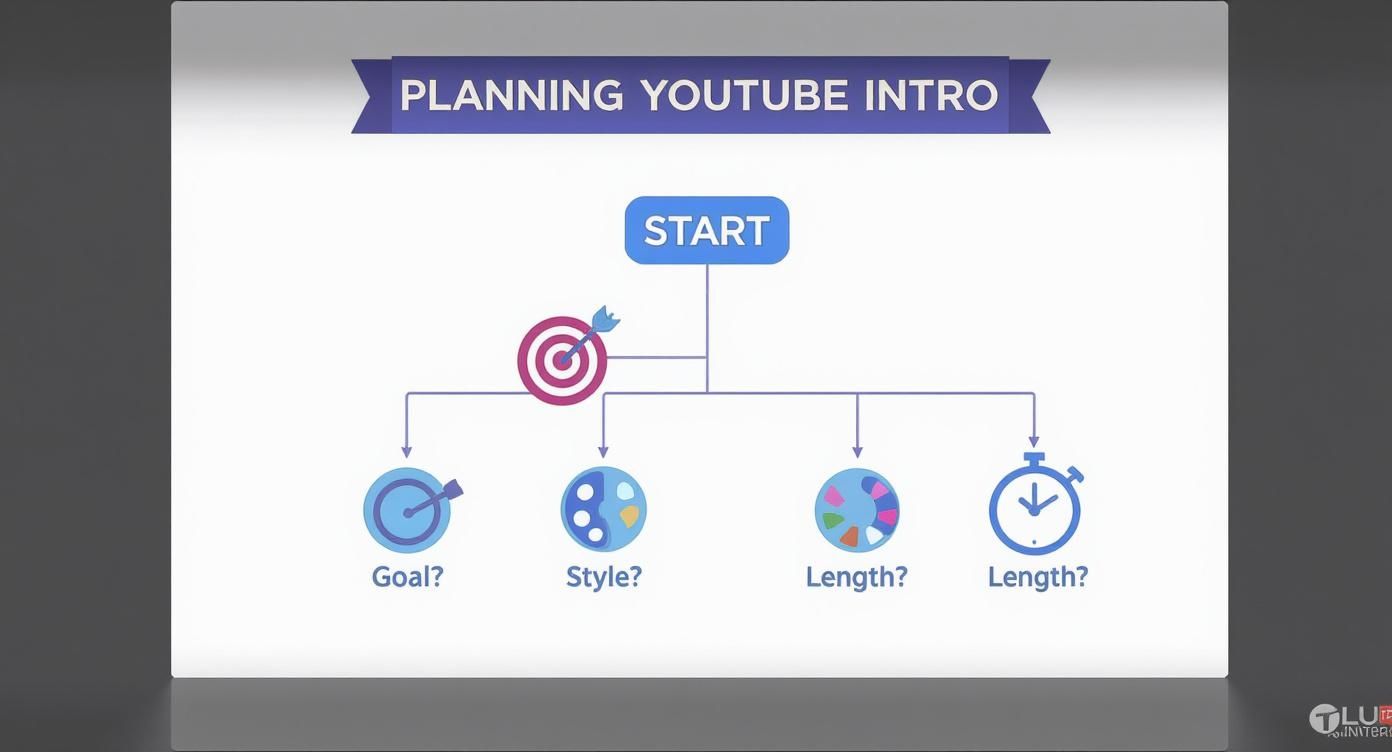
Thinking through this flow first makes sure you pick a tool that can actually bring your vision to life, saving you a ton of time and frustration.
Comparing Different Video Intro Maker Tools
To make the decision a little easier, here's a quick rundown of the main types of tools out there. This should help you figure out which one is best for you and your channel.
| Maker Type | Best For | Pros | Cons |
|---|---|---|---|
| Online Template Sites | Beginners, creators who need something fast | Super easy to use, quick, affordable, no software to install | Limited customization, templates can look generic |
| Desktop Video Editors | Intermediate users who want more control | Good balance of templates and manual control, one-time purchase | Harder to learn than online tools, can slow down your computer |
| Pro Animation Software | Professional animators, brands with specific creative ideas | Total creative freedom, unique and custom results | Very expensive, takes a lot of skill and time to learn |
| AI-Powered Tools | Creators of all levels looking for an easy way | Automated animation, smart suggestions, incredibly fast | Can sometimes lack a human touch, results depend on the AI's quality |
Ultimately, the goal is to find a tool that fits your skills, your budget, and how much time you're willing to spend.
The Rise of AI in Intro Creation
Lately, AI-powered tools have completely changed the game, making stuff that used to be complicated and time-consuming easy for anyone. It’s pretty amazing. Today, over 40% of intro makers have some kind of AI feature, like automated animations or smart template suggestions that match your brand. Because of this, the average time it takes to create a professional-looking intro has dropped from hours to less than 15 minutes.
The best intro maker for you is the one that gets you from a blank page to a finished intro with the least amount of hassle. Don't pay for a bunch of features you'll never use, but don't settle for a tool that can't make something that looks great.
To help you explore the possibilities, check out this guide on AI video editing software options, as many of them are fantastic for intro creation. And of course, if you'd rather leave it to the pros, you can always work with dedicated YouTube intro creators who handle all the technical stuff for you.
Making a Template Your Own

Using a template is a huge head start, but let's be real—nobody wants an intro that looks exactly like a dozen other channels. The great thing about templates is that they are just a starting point. With a few smart changes, you can turn a standard design into a signature intro that feels 100% you.
This isn’t about starting from scratch. It’s about putting your channel's personality into a professional, pre-made design. Think of it like buying a new pair of plain white sneakers; they’re great as is, but they only become yours when you add cool laces or draw a unique design on them.
Find the Right Typeface
One of the fastest ways to change the entire vibe of an intro is to switch the font. The font you choose has a huge impact on how people see your brand. A bold, blocky font can feel strong and confident, while a fancy script might feel more personal and artistic.
Your goal is to find a font that just feels like your channel.
- For Tech or Gaming Channels: Clean, modern fonts like Montserrat or Roboto are usually a safe bet. They look slick, professional, and are super easy to read.
- For Lifestyle or Creative Channels: You can have more fun here. A stylish or handwritten font can add a touch of personality that makes you stand out.
- For Educational Content: It has to be easy to read. A clear, simple font makes sure people can instantly read your channel name and any slogans.
Don't just pick the flashiest font you can find. Choose one that truly matches the tone of your videos and reinforces your brand every time it shows up on screen.
The best changes feel like they have a purpose. Every part—from the font to the colors—should work together to tell the same story about your channel. It’s this consistency that makes an intro memorable.
Use Your Brand Colors
Color is another total game-changer. Most templates let you easily swap the default colors for your own. If you already have brand colors for your channel banner and thumbnails, this is the perfect place to use them again. Sticking to your colors creates a professional look across your entire YouTube channel.
Don't have brand colors yet? No worries. Think about the emotions you want your videos to create. Blues and greens often feel calm and trustworthy, while reds and oranges are high-energy and exciting. A good rule of thumb is to pick two or three colors that go well together. This keeps your intro from looking messy and keeps it clean and polished.
For example, a finance channel might use a deep navy blue and a crisp white for a professional feel, while a travel vlogger could use a sandy beige and a bright turquoise to give off a sense of adventure. Color isn’t just for looks; it’s a powerful way to communicate.
Get the Timing and Pacing Right
The default timing on a template isn’t always the perfect fit. A great intro maker should let you adjust the speed of the animations. Think about the energy of your videos. If you make fast-paced vlogs, you’ll probably want to speed up the animations in your intro to match that energy.
On the other hand, if your channel is all about calm tutorials or storytelling, slowing things down can create a more relaxed and welcoming vibe. Play around with the timing until it feels right. A well-paced intro should flow smoothly into your main video, not feel like a sudden interruption.
With short videos being so popular, timing is more important than ever. Studies show that videos with well-made custom intros can get 35% more views and 25% higher engagement. Viewers don't have a lot of patience, so your intro needs to be quick, punchy, and get straight to the point.
Bring It to Life with Sound
Sound is probably the most powerful tool you have for making an intro unforgettable. The right music and sound effects can turn a simple animation into something truly special.
Here’s how to nail the audio:
- Pick the Perfect Music: Find a royalty-free song that captures your channel's vibe. The music instantly sets the emotional tone.
- Add Sound Effects (SFX): Small sounds make a huge difference. A little "whoosh" as your logo appears or a soft "click" as text shows up adds a layer of polish that makes your intro feel more professional.
- Sync Audio to Visuals: This is the most important step. Time your sound effects and musical beats to match what's happening on screen. When a key moment in the music hits just as your logo fully appears, the impact is way bigger.
With so many amazing templates out there, you're sure to find a great starting point. If you’re looking for high-quality designs to customize, you can explore these fantastic After Effects intro templates to get started. By focusing on these little details, you can create an intro that’s not just professional, but totally you.
Getting the Technical Details Right

So, you've done the creative work. You've designed an awesome intro, found the perfect music, and made sure it screams your brand. But all that effort can be wasted if the final video file is blurry or doesn't work with your editing software.
Getting the technical stuff right is that last important step. It makes sure your intro looks as sharp on YouTube as it did in your head. Don't worry, you don't need to be a video expert for this. Let's break down the basics.
Aim for High Definition, Always
First up is resolution. That’s just a fancy word for how clear and detailed your video is. For pretty much any platform today, especially YouTube, you should always be working in at least 1080p (1920×1080 pixels). This is the standard for high definition (HD), and it’s what keeps your intro from looking fuzzy, especially when someone watches on a big computer screen or a TV.
The other piece of this puzzle is the aspect ratio, which is just the shape of your video frame. The universal standard for YouTube and most online video is 16:9. It’s that familiar widescreen shape. Sticking to it means your intro will fill the screen perfectly, with no annoying black bars on the top or sides.
Choosing the Right File Format
Once the animation is done, you need to save it as a video file. You'll almost always be choosing between two main options: MP4 and MOV. They might seem similar, but they have some important differences that can affect your editing.
- MP4 (.mp4): This is the go-to format for online video. MP4 files give you great quality without being huge, which makes them easy to download, store, and edit. They work on just about every device and editing program out there.
- MOV (.mov): Originally from Apple, the MOV format is a favorite among professional editors, especially those using tools like Final Cut Pro or Adobe Premiere Pro. It can handle super high-quality video and, most importantly, it supports something called an "alpha channel."
For a simple intro that just plays at the beginning of your video, an MP4 is your best bet. But if you want to get a little fancier, you'll need to know about transparency.
The technical quality of your intro sends a message to your viewers. A crisp, high-definition intro shows that you care about quality, which builds trust before you’ve even said a word.
The Power of a Transparent Background
Ever seen a logo animation that plays over the top of a video clip, with no solid background behind it? That’s the magic of an alpha channel. It’s basically an invisible layer in the video file that tells your editing software which parts of the picture should be see-through.
This is where the MOV file format really shines.
To do this, your intro needs to be saved in a format that supports transparency, like a MOV file. When you drop this file into your editing timeline, you can place it on a layer above your main video. Only the animated parts will show up, letting your video play underneath. It’s a pro move that makes your branding feel super clean and professional.
If you're just starting out with animation and want to understand more about this stuff, our guide on how to animate a logo is a great place to learn how to bring your brand to life.
Common Questions About YouTube Intros
Once you've got a killer intro made with a quality video intro maker for YouTube, a few more questions might pop up. That's totally normal. Nailing these little details is what separates the good channels from the great ones.
Let's go through some of the most common things creators ask. Think of this as the final check to make sure your channel's new look really shines.
How Long Should My YouTube Intro Be?
Keep it short and sweet. The ideal length for a YouTube intro is between 3 and 7 seconds.
This is the sweet spot. It’s just enough time to show your brand and set the tone without making people antsy. They clicked on your video for the content, and a long intro is a great way to make them leave.
For faster-paced videos or YouTube Shorts, you should aim even shorter—think 1 to 3 seconds. The goal is always to get to the good stuff quickly while still looking professional.
Remember, every second counts. A short, punchy intro tells your viewers you respect their time, which is one of the best ways to get them to stick around.
Can I Use the Same Intro for All My Videos?
Absolutely! In fact, you probably should. Using the same intro across your videos is one of the easiest and best ways to build a recognizable brand.
Over time, viewers will start to connect that specific animation and sound with your channel. When they see it, they'll know exactly whose video they're watching.
A smart little trick is to create slightly different versions for different video series. This helps you show what kind of video is coming up while keeping everything under the same brand.
For example:
- Main Intro: Use your standard intro with your main brand colors (like blue and white) for all your regular videos.
- Series-Specific Intro: Tweak it slightly for a weekly show. Maybe switch to a secondary brand color (like green and white for a "Weekly Tips" series).
This helps viewers instantly know what they're watching, all while making your channel feel organized and well-planned.
Where Do I Find Music for My Intro?
This one's a big deal. Using royalty-free music is a must if you want to avoid copyright strikes that can seriously hurt your channel. Luckily, you have some awesome options for finding high-quality, safe-to-use audio.
Your first stop should be the YouTube Audio Library. It's built right into YouTube Studio, it’s completely free for all creators, and it has a massive collection of music and sound effects you can use without any stress.
If you're looking for something a bit more unique or epic, a subscription service might be the way to go.
- Epidemic Sound has a huge library and a really simple license that covers everything.
- Artlist is known for its high-quality, cinematic music that can give your intro a really premium feel.
No matter where you get your music, make sure its energy and vibe match your channel. The right song should make your visuals even better, not fight with them.
Should My Intro for YouTube Shorts Be Different?
Yes, without a doubt. People watch Shorts with a totally different mindset. They're scrolling fast, and they expect to see action right away. A standard 5-second intro feels like forever in the Shorts feed and is the fastest way to get someone to swipe away.
For Shorts, you really only have two good options:
- Skip the Intro Entirely: Just jump straight into the action. Hook them from the very first second.
- Use a 'Stinger': This is a super-fast, 1-2 second animated pop of your logo or channel name. It's a quick brand moment that doesn't slow anything down.
The key with Shorts is to get rid of anything that might make someone scroll away. A long intro is a big no-no. Change your strategy, and you'll keep your Shorts content punchy, engaging, and perfect for how people actually watch them.
Ready to create an intro that grabs attention and builds your brand? Priyansh Animations offers a huge catalog of professional, customizable video intros that are perfect for any YouTube channel. Choose a template, send your text, and get a stunning intro delivered fast. Start building your brand today at https://www.priyansh.net.