Think of your movie intro like the first handshake. It needs to be strong, confident, and leave a great first impression. This isn't just about sticking a title on the screen; it's your first real chance to grab someone's attention, set the mood for the whole story, and promise them that what they're about to watch is going to be awesome.
A really great opening is often what makes a movie memorable versus one that's instantly forgettable.
Why a Great Movie Intro Is Your Secret Weapon
Ever notice how the first 30 seconds of a movie can stick in your head long after it's over? That’s a killer intro doing its job. In a world where we're swimming in videos and shows, a powerful opening is your best bet to make people curious and show off your unique style. It’s the difference between a viewer leaning in, totally hooked, or reaching for their phone.
Think about it. A summer blockbuster's intro feels fast and exciting, while a scary movie's intro is slow and creepy. They use visuals, music, and even the font of the title to create a specific feeling before anyone even says a word. That first impression is everything.
Setting the Stage for Success
A great intro does more than just look cool; it has a job to do. It needs to:
- Set the Tone: Is this a dark mystery, a funny comedy, or a huge adventure? Your intro tells the audience what to expect right away.
- Hook the Viewer: It should ask a question or show something so cool that the audience has to see what happens next.
- Introduce a Theme: It can give little clues about the main ideas or conflicts that the story will be about.
Making that first connection is more important than ever. The global movie industry is massive, and it's expected to grow to a mind-blowing $169.68 billion by 2030. With so many movies out there, you have to fight for attention from the very first second. You can see just how big the market is in this analysis from GrandViewResearch.
This chart from their report shows just how much the industry is expected to grow. It’s a clear sign that standing out is a big deal.
The numbers don't lie—you have to make an impact, and your intro is the perfect place to start. If you're looking for some creative ideas, exploring different https://www.priyansh.net/ideas-for-introductions/ can be a huge help.
Developing Your Core Intro Concept
Before you even open an app or editing program, the most important work happens in your brain. An intro with cool effects but no real idea behind it is just flashy noise. Think of this planning step like drawing a blueprint for a house. It’s where you figure out the feeling and direction before you spend hours animating. This plan will guide every choice you make later on.
So, let's start with one simple question: what’s the main feeling you want your audience to have? Do you want their hearts pounding with excitement? A quiet, creepy feeling of dread? Or maybe the warm, fuzzy feeling of a family story? Nailing this main emotion is the key to making an intro that really connects with people.
Sketching Out Your Vision
Once you know the feeling you're going for, it's time to get it out of your head and onto paper. You don't need to be a great artist for this; a simple storyboard is your best friend. Seriously, just grab a pen and paper.
- Stick figures are your friends. You just need to map out the basic flow. A quick sketch of a title popping up, then a shape moving across the screen, is all you need to start.
- Plan your text. Think about when and how your words appear. Does the main title smash onto the screen, or does it fade in gently?
- Think about timing. What’s the rhythm? Scribble notes like, "quick cuts here," or "slow zoom on the logo."
This simple exercise helps you see problems and make your ideas better before you're stuck deep inside your editing software. It’s like a rough draft for your intro, making sure the final version feels planned and polished.
My Two Cents: A quick, hand-drawn storyboard is way more useful than jumping straight into a complicated program. It forces you to get your idea straight and will save you hours of headaches later. Good planning is the secret ingredient.
Defining Your Style Elements
With a rough plan sketched out, you can start adding the details that bring your idea to life. The right colors and fonts can tell your audience the movie's genre and mood before they see anything else.
For example, a sci-fi thriller might use cold blues and grays with a sharp, digital-looking font. A romantic comedy, on the other hand, would probably use warm, happy colors and a more fun, elegant font. If you're looking for more ideas, our detailed guide on how to make a video intro has some awesome, practical tips to help you nail these important style choices.
The key isn't just to pick what looks cool, but to choose things that help tell the story. Every color, every font, and every movement should support that main emotion you decided on earlier. This is what separates a beginner's opening from a truly cinematic one.
Choosing the Right Tools for the Job
https://www.youtube.com/embed/lTeperbIZBc
Okay, you’ve got a solid idea planned out. Now it’s time to get your hands dirty and make it real. The first big decision is what software to use. Honestly, it comes down to your budget, your computer skills, and how much control you want over the final product.
There are really two ways you can go. You can use a simple, template-based tool, or you can go all-out and build your intro from scratch with professional software. Neither way is "better"—they just work for different people with different needs.
The Fast Lane with Intro Makers
For beginners or anyone in a hurry, online intro makers are a lifesaver. These websites are made to give you a professional-looking result in minutes, without all the complicated and sometimes frustrating parts of animation.
The process is usually super simple: pick a template you like, type in your titles, maybe change the colors to match your style, and hit export. It’s easily the fastest way to create a movie intro without needing to be a motion graphics expert.
The downside? You’re stuck with what the template offers. You can only use the animations and designs on the platform. This is great if you find a style that's a perfect match, but it can feel a bit like painting by numbers if you have a really specific idea in mind.
Full Control with Professional Software
If you're the kind of person who wants to control every little detail, then professional software is what you need. There's a reason pros use tools like Adobe After Effects—you can create almost anything you can imagine. You can build completely custom animations, add cool visual effects, and tweak every element until it's perfect.
Of course, all that power means it’s harder to learn. It takes real time and effort to get good at software like After Effects. But if you're up for the challenge, you'll end up with an intro that is 100% unique to your project.
A good middle ground is to use pre-made templates inside these powerful programs. You can find some amazing After Effects intro templates that give you a professional starting point, saving you time while still letting you customize everything.
Deciding which way to go is all about balancing speed and control. Ask yourself: Do I need something good right now, or do I want to build something that’s totally my own? Your answer will lead you to the right tool.
Here’s a quick comparison to help you figure out what’s best for your project.
Movie Intro Software Comparison
| Software/Tool | Best For | Skill Level | Key Features |
|---|---|---|---|
| Adobe After Effects | Total customization, pro effects | Advanced | Custom animations, 3D elements, tons of plugins |
| Online Intro Makers | Speed, easy to use, for non-designers | Beginner | Lots of templates, simple changes, fast results |
| DaVinci Resolve | All-in-one editing & motion graphics | Intermediate | Built-in color grading, effects, node-based system |
| Blender | High-end 3D animation | Advanced | Free to use, powerful 3D tools, realistic physics |
This table should give you a better idea of what each tool is good for. Don't feel like you're stuck with one choice forever; many pros start with templates and slowly build up their skills.
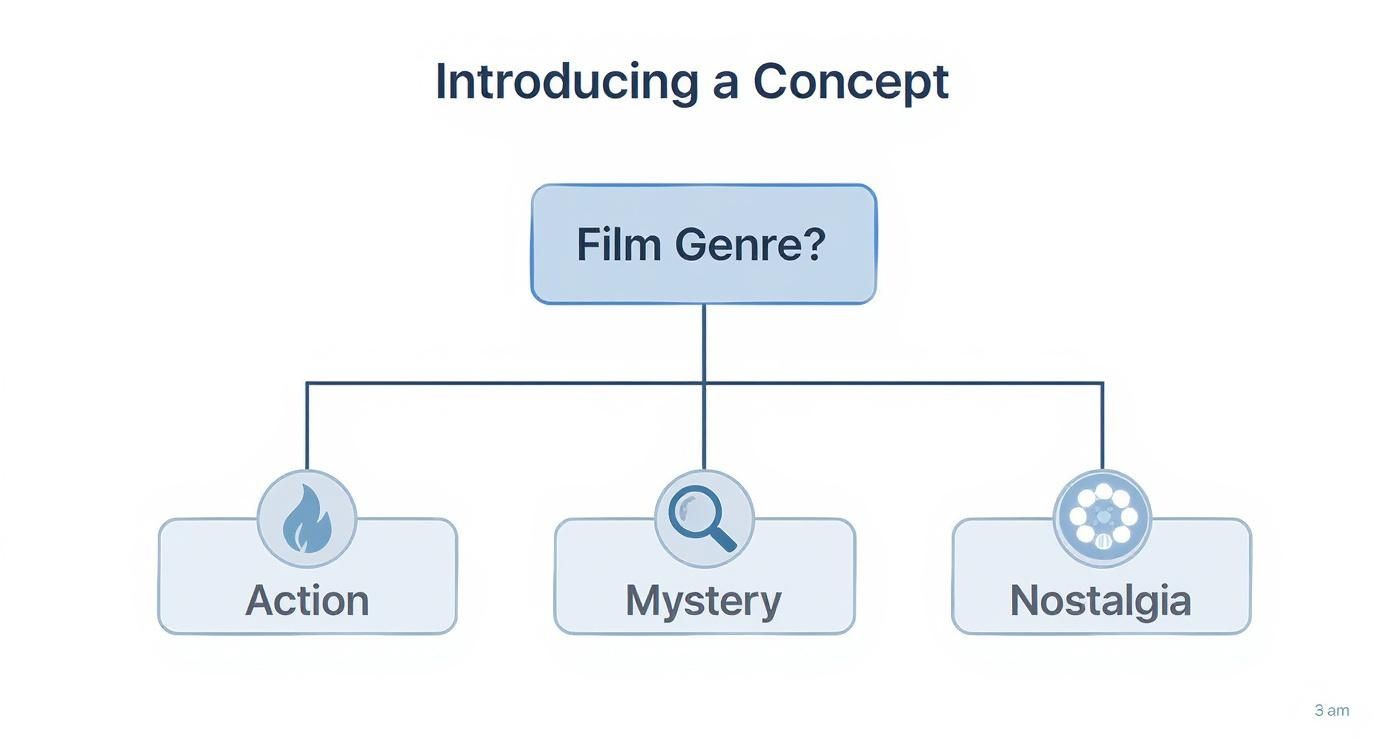
As this graphic shows, once you pick a genre—like Action, Mystery, or Nostalgia—that decision helps you choose your style for everything from icons and colors to the overall mood of your intro.
Ultimately, picking the right tool is about finding a way to work that feels good to you. The goal is to make an intro you're proud of without getting super frustrated along the way. Don't be afraid to start simple and move up as you get more comfortable.
Bringing Your Movie Intro to Life
Alright, you've got your idea sketched out and you know what tools you're using. Now for the fun part: actually making your movie intro. This is where your ideas jump off the paper and onto the screen, turning your plan into a real visual experience. The goal is to build something that not only looks cool but also makes your audience feel something.
First, you need to build the visual foundation. This is your canvas. Are you picturing big, cinematic shots of a city at night, or something more abstract with cool swirling graphics? There's no wrong answer—it just needs to match the mood you decided on earlier.
A sci-fi film, for example, might need custom animations of glowing grids and futuristic screens. A historical drama, on the other hand, could use old photos to feel more real. You can even use AI picture to video tools to bring still images to life, creating cool motion without needing to be an animation expert.
Mastering Typography and Text Animation
Think of your title as more than just words—it’s like a character in your story. The way your text shows up, moves, and disappears says a lot about your intro's vibe. Let's go beyond a simple fade-in and give your titles some real personality.
- Animate with Purpose: Does your title slam onto the screen for an action-packed jolt? Or does it drift in slowly to create a sense of mystery? Every animation should help tell the story.
- Placement is Key: Use visual guides like the rule of thirds to draw the viewer’s eye right to the title. Try to avoid putting text over busy parts of the video where it can get lost.
If you have a logo, giving it a subtle, smooth animation can make a huge difference. For a closer look, our guide on https://www.priyansh.net/how-to-animate-a-logo/ is a great resource for adding that professional touch.
This is where software like Adobe After Effects is amazing, giving you a huge playground for text animation and visual effects.
As you can see, the powerful timeline lets you control every single detail, from how a title appears to adding complex visual effects.
Syncing Visuals with Sound
Your intro’s rhythm is its heartbeat. The best intros are the ones where every cut and every title appearance is perfectly timed to the music and sound. This creates an energy that pulls the viewer in from the very first second.
Listen carefully to your soundtrack. Find the key moments—the beat drops, the big musical swells, the quiet pauses. Time your biggest visual moments to happen at the exact same time as these audio cues. When the visuals and sound hit together, the impact is 10 times stronger.
Pro Tip: Don't forget the small details. Little things like light leaks, a bit of film grain, or floating dust particles can make your intro feel more real and less "digital." These tiny details are often what makes a good intro truly great.
Getting these details right is more important than ever. As technology gets better and audiences expect higher quality, movie studios are always finding new ways to open their films, turning a simple title screen into an unforgettable experience. You can read more about how viewer tastes are changing modern movies over on Statista.com.
Adding Cinematic Sound and Music
An intro without sound is like a movie without popcorn—it just feels like something important is missing. Audio is what breathes life into your visuals, turning a cool animation into something that gives you goosebumps. This is where your intro finds its soul.
Choosing the right audio isn't just about filling silence; it's about cranking up the exact emotion you're trying to create. The first big choice is the music. Are you going for that epic, heart-pounding feeling, or something more quiet and mysterious?
For a really big, epic feel, think about the music you hear in movie trailers. You can find awesome inspiration from music from composers like Two Steps From Hell, who are masters of that huge, cinematic sound. The goal is to find music that perfectly matches the energy and speed of your visuals.
Layering in Sound Effects
Music sets the overall mood, but sound effects (SFX) are what make everything on screen feel real. These are the small audio details that give every movement a sense of weight and impact.
Think about it. When a title slams onto the screen, a deep bass drop or a sharp thud makes it feel huge. When text glides smoothly into view, a subtle whoosh gives it a feeling of speed. Don’t skip these details; they’re what make your intro feel professional instead of amateur.
Here are a few types of SFX you can add:
- Impacts and Hits: Perfect for when a logo or title appears suddenly.
- Whooshes and Swishes: Use these to add energy to any moving text or graphics.
- Risers and Buildups: These are great for building suspense right before a big moment.
- Ambient Tones: A subtle background sound can add depth without being distracting.
Mixing Your Audio for a Polished Finish
Once your music and sound effects are in place, the last step is making them all work together. This is called audio mixing, and you don't need to be a pro to get the basics right. The main goal is balance.
Your music is the foundation, but it shouldn't be so loud that it drowns out the sound effects that you synced up so perfectly.
A great trick is to slightly lower the music volume for the split second a key sound effect plays. This is called "ducking," and it helps the SFX pop with more clarity. If you want to learn more about the basics, you might find these video editing tips for beginners helpful.
With a record 9,511 films produced worldwide in 2023—a 68% jump from 2020—the competition for people's attention has never been tougher. In a crowded world, great sound is one of the easiest ways to make your project feel like a step above the rest.
Final Thought: Your intro’s sound is its emotional engine. Take the time to get the music and effects just right, and your audience will feel the difference before the first scene even starts.
Tying Up Loose Ends: Common Intro Questions
Even with a solid plan, a few questions always come up when you’re making a movie intro. That's totally normal. Think of this section as a quick FAQ to help you get past the most common problems people face.
Let's clear these up so you can finish your project and feel awesome about it.
How Long Should My Intro Be?
This is probably the #1 question I get asked. There’s no single perfect length, but a good rule of thumb is to keep your intro between 10 to 30 seconds. How long it should be really depends on where people will be watching it.
- For YouTube or Short Films: Shorter is almost always better. Aim for 10-15 seconds. People online have short attention spans, and you need to get to the main event before they think about clicking away.
- For Feature Films or Big Projects: Here, you have a little more time. You can go up to 30 seconds or even a bit longer, but only if the intro is an interesting story all by itself. Think of the famous James Bond or Star Wars openings—they earn that screen time.
The bottom line? Every second has to matter. Your goal is to set the mood and grab the viewer, not make them bored.
Where Can I Find Good Audio?
Great audio can make an intro amazing, but you don't need a huge budget. There are some awesome places to find royalty-free music and sound effects.
Subscription sites like Epidemic Sound or Artlist are my favorites because they have huge, high-quality libraries. If you're on a tighter budget, the YouTube Audio Library and Pixabay have some surprisingly good free options. Just remember to double-check the license for each track to make sure you can use it, especially if it's for a commercial project.
Pro Tip: Don't just use a music track. Layering in a few subtle sound effects—a soft whoosh for text appearing or a deep thump for a logo reveal—is a classic trick that instantly makes your intro feel more professional.
What Are the Best Export Settings?
You've done all this creative work, so don't mess it up at the very end with the wrong export settings. Getting this right makes sure your intro looks just as good on a big 4K TV as it does on a phone.
For sharp quality that works almost everywhere, these are the settings I nearly always use:
- Codec: H.264. It's the standard for a reason—it works everywhere online.
- Container: MP4. This file type is compatible with pretty much everything.
- Resolution: 1920×1080 (1080p) is the perfect middle ground. Only go for 4K (3840×2160) if your main video is also 4K.
- Frame Rate: Match the frame rate of your main project—usually 24 or 30 FPS.
- Bitrate: For 1080p, a bitrate between 10-15 Mbps will give you a crisp image without making the file size gigantic.
Ready to create a professional movie intro without the steep learning curve? At Priyansh Animations, we design custom, studio-quality intros that will make your project stand out. Choose a style, provide your text, and let us handle the rest. Get your stunning, custom intro at https://www.priyansh.net.