Think of an animated intro maker as your secret weapon for creating that perfect, polished opening for your videos. It’s what gives your content a professional vibe right from the start, acting like a digital handshake that tells viewers your channel means business.
Why a Great Video Intro Matters More Than Ever
When was the last time you clicked off a video almost immediately? My guess is it didn't grab you in those first few seconds. This is exactly where a sharp, custom intro can change the game. It's not just some flashy graphic; it's a powerful branding tool that sets the mood for everything that follows.
A slick intro instantly makes you look like a pro. It tells your audience that you’ve put real thought and effort into your work, which builds trust right away. For a new viewer, that split-second judgment can be the difference between them sticking around or clicking away.
Building Your Brand Identity
Your intro is a huge piece of your brand's DNA. It's that familiar element that pops up in every video, making your content instantly recognizable. Think about the big YouTube channels you follow—you can probably hum their intro music or picture the visuals in your head. That's branding in action.
A strong intro helps you do a few key things:
- Establish a Consistent Look: Using the same colors, fonts, and logo in your intro helps lock in your visual identity.
- Set the Tone: Is your channel fun and high-energy? Or is it more serious and educational? The style of your intro should perfectly match that vibe.
- Boost Viewer Retention: A killer opening animation doesn't just look cool; it grabs attention and makes people want to see what's next.
This is more important than ever. Businesses get it, with 86% of them now using video for marketing. Even more telling, 93% of marketers say video directly increases brand awareness. A custom intro is how you make sure your content stands out from the crowd.
An animated intro is your content's signature. It's the first promise you make to your viewer about the quality and personality of what they are about to watch. Get it right, and they'll be hooked before your main content even begins.
Making a Lasting First Impression
At the end of the day, a great intro is all about making a memorable first impression. It’s like a cool welcome mat for your digital space. Whether you're making a YouTube series, a school project video, or a quick social media clip, those first few seconds are your golden opportunity to show viewers they've come to the right place.
If you're ready to dive in, you can find a more detailed guide on how to make a video intro that really grabs people's attention.
Planning Your Intro Before You Start Creating
Jumping straight into an animated intro maker without a game plan is like starting a road trip with no destination in mind. Sure, you’ll get somewhere, but it probably won’t be where you wanted to go. Taking a few moments to plan first is the secret sauce for an intro that feels intentional and actually connects with your audience.
Before you even think about touching any software, ask yourself: what is this intro for? Is it for a high-energy YouTube gaming series? A polished corporate video? Or maybe a quirky, quick-cut TikTok channel? The purpose really does dictate everything that comes next. A gaming channel intro can get away with flashy, fast-paced animations, while a corporate video needs something that immediately says "clean and trustworthy."
What's Your Brand's Personality?
Your intro is your visual handshake. It’s the first impression. So, what kind of personality do you want to show off? This single decision will guide your choice of colors, fonts, and music more than anything else. Don’t just pick what looks cool; pick what feels right for the content you create.
Here are a few common vibes that work well:
- Energetic and Bold: This is all about bright colors, fast motion, and maybe some upbeat electronic music. It’s perfect for content that’s exciting and fast-paced.
- Clean and Professional: A more minimalist approach can work wonders. Think simple color palettes, elegant fonts, and subtle animations that build immediate authority and trust.
- Fun and Quirky: Hand-drawn elements, playful fonts, and fun sound effects can make your brand feel friendly and one-of-a-kind.
Nailing this down beforehand makes using any intro maker way easier. You'll know exactly what kind of templates and styles to look for instead of just browsing forever.
Get Your Stuff in Order
With a clear direction in mind, it's time to gather your materials. Having these files ready to go will save you a ton of time and prevent that frustrating feeling of having to stop and search for things while you're creating.
In my experience, the most common mistake new creators make is using a fuzzy, low-quality logo. A crisp, high-resolution logo is a must-have if you want a professional-looking intro.
Make sure you have these key items on hand:
- Your Logo: A high-resolution version is a must. The best format is a transparent PNG file. This lets you place it over any background without that ugly white box around it.
- Your Brand Colors: If you have them, know the specific hex codes for your main colors. This ensures perfect consistency and makes your intro look like it truly belongs to your brand.
- Your Core Text: Decide on the exact text you want to feature. This might be your channel name, a short slogan, or your website URL.
This little bit of prep work is what separates a generic, forgettable intro from one that really sticks with your audience. By figuring out your purpose, personality, and assets first, you’re setting yourself up to create something that feels polished, professional, and uniquely you.
How to Choose the Right Animated Intro Maker
With so many options floating around, picking the right animated intro maker can feel a bit overwhelming. But it doesn't have to be. The trick is to find a tool that actually fits your skill level, budget, and how much you want to mess around with the final product.
The whole animation software scene is blowing up right now, thanks to the massive demand for cool visual content. The global market is expected to shoot up to USD 1.5 billion by 2035, a huge leap from its USD 576.7 million value in 2025. What does this mean for you? More choices, from super simple tools to pro-level software.
Understanding the Different Types of Intro Makers
Not all intro makers are built the same. They really fall into a few key categories, each one suited for a different kind of creator.
- Browser-Based Template Editors: These are your go-to for speed and simplicity. You just pick a template you like, drop in your logo and text, and you're done. Perfect for beginners who need something polished without any hassle.
- Desktop Software: Think Adobe After Effects. This is where you get total creative control, but get ready for a steep learning curve. It's the right choice if you want something truly custom and have the time to learn the software.
- Mobile Apps: Creating videos on your phone? These apps are a lifesaver for adding a quick, clean intro. They're all about convenience and usually use templates.
If you're looking for a good starting point, many lists of the best AI video generators also feature some excellent intro-making tools.
This quick flowchart can help you think through what you really need based on your project's goals and the assets you already have.
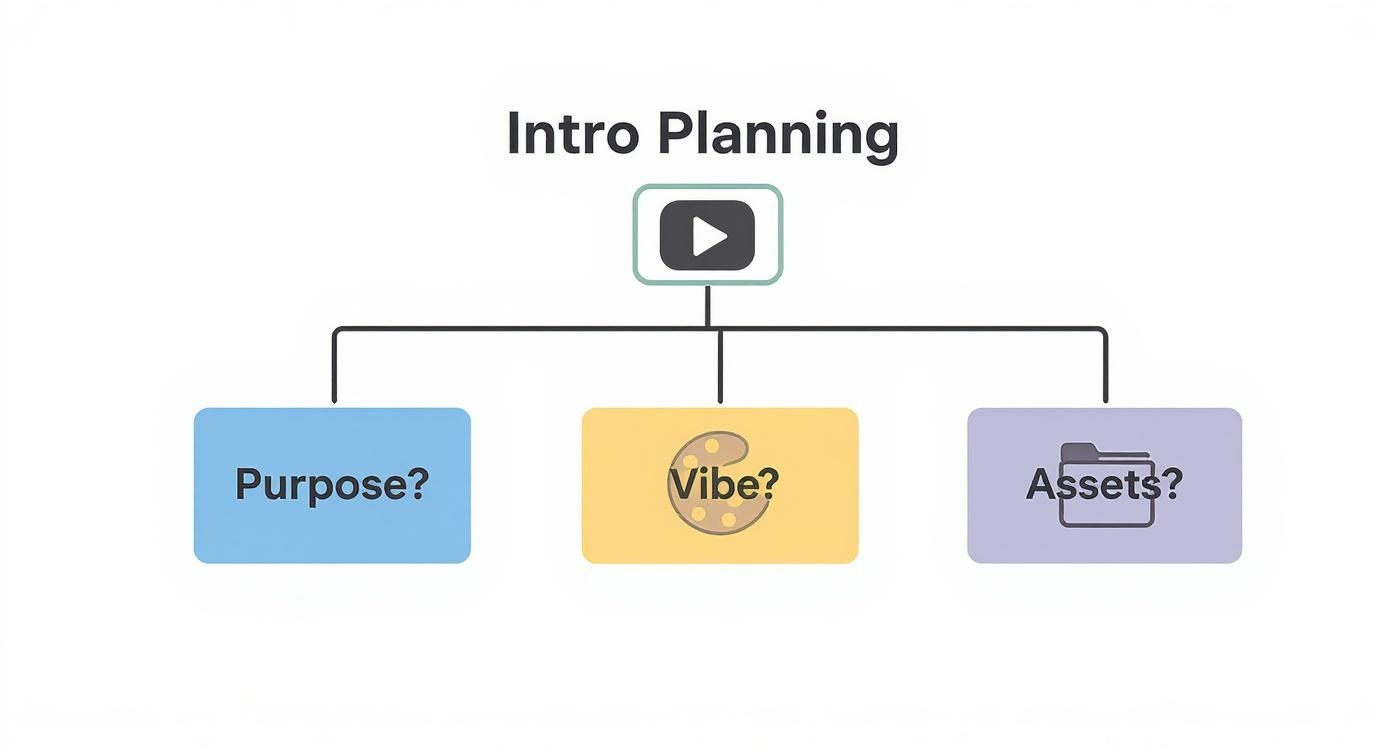
As you can see, getting clear on your goals first makes picking the right tool—and not wasting a bunch of time—so much easier.
To help you decide, here’s a quick breakdown of the common tool types.
Feature Comparison of Different Intro Maker Types
| Tool Type | Best For | Typical Cost | Customization Level |
|---|---|---|---|
| Browser-Based | Beginners & quick projects | Free (with watermark) to ~$30/mo subscription | Low (templates) |
| Desktop Software | Professionals & unique branding | ~$20-50/mo subscription or one-time fee | High (from scratch) |
| Mobile Apps | On-the-go creators | Free to ~$10/mo subscription | Very Low (basic templates) |
| Hire a Service | Anyone wanting a pro result without the work | Starts from ~$25 per project | Moderate to High |
Ultimately, the best choice depends on what you value most: speed, control, or cost.
Balancing Cost, Customization, and Ease of Use
In the end, your decision will probably boil down to those three things: how much you can spend, how unique you need it to be, and how easy the tool is to use.
The best tool for you isn't always the most powerful one—it's the one that lets you create a great-looking intro without the headache. Pick a smooth workflow over endless features you may never use.
Pay attention to the pricing. A lot of online tools have free versions that slap a watermark on your video, while others are subscription-based. Desktop software can be a bigger hit to your wallet. If you just need one or two intros, a pay-per-project intro video maker online like ours is often the smartest move.
It’s all about trade-offs. A simple online tool is fast and cheap but locks you into a template. Pro software gives you all the power but costs you in both time and money. Figure out what matters most for your project right now, and go from there.
Turning a Template Into Your Unique Brand Intro
Alright, this is where the magic happens. You’ve planned everything out, picked your animated intro maker, and now it’s time to take a pre-made template and make it feel like yours.
Think of a template as a fantastic starting point—a solid foundation, not the finished house. With the right tweaks, you can craft something that feels completely custom-made. The trick is to look at every element, from the text to the timing, as a chance to add your brand's personality. Don't just accept the defaults; they're placeholders waiting for your creative touch.
Choosing a Template That Fits Your Vibe
Before you even think about colors and fonts, you need to pick the right template. This is honestly half the battle. Don't just scroll and grab the first one that looks cool. You’re looking for a template whose core animation style and energy match the brand personality you worked so hard to define earlier.
Ask yourself a few questions as you browse:
- What's the pacing like? Is it fast-paced with quick cuts, or is it more slow and elegant? This should match the feel of your content.
- Where does the logo go? Look at where the template naturally puts the logo. You want it to be in a main spot that works with your logo’s shape and size.
- Is there enough room for text? Some templates are all about the visuals, while others have plenty of space for your channel name and maybe a tagline. Make sure it fits what you need.
When you choose a template that already has the right bones, the customization process becomes so much smoother. It's way easier to work with the template's structure than to try and force it to be something it's not. To make sure your animated intro really represents you, it helps to pull ideas from a good social media branding guide.
Making It Your Own: Customization Tips
Got your template? Great, now for the fun part. This is what separates a generic intro from one that people actually remember. I recommend focusing your energy on these three areas to get the most impact.
- Logo and Assets: Start by uploading a high-resolution version of your logo. A transparent PNG file is almost always your best bet. Then, play with the size and position. It needs to be instantly readable but not so huge that it completely takes over the screen.
- Colors and Fonts: This is probably your biggest opportunity to show off your brand. Don't just pick a blue that looks "close enough." Swap out the template's default colors with your exact brand hex codes. Then, choose a font that screams you—whether that’s bold and modern or clean and classic.
- Music and Sound: Seriously, don't forget the audio! The music you choose should pump up the energy of the visuals, not fight against them. Most intro makers have a library of royalty-free music, so take a few minutes to find a track that sets the perfect mood.
The goal here isn't just to slap your logo on something. It's about making every single element of the template feel like it belongs to your brand. That's how you build a consistent, professional look that your audience will recognize in a heartbeat.
The huge demand for these tools really shows how much video content has taken over. The global intro maker software market was valued at a whopping USD 1.2 billion in 2023 and is on track to hit USD 3.1 billion by 2032. That growth just proves how important a polished intro has become for creators trying to stand out.
By really focusing on these customization steps, you can turn a simple template into an incredibly powerful branding tool.
Common Intro Mistakes and How to Avoid Them
Making a killer intro is as much about dodging common mistakes as it is about being creative. I've seen countless creators, especially those just starting out, make a few key errors that can immediately scream "amateur." The good news? They're incredibly easy to fix once you know what to look for.
By avoiding these common blunders, you can make sure your intro pulls people in instead of pushing them away. Let’s break down the biggest offenders and give you some simple, practical fixes.
The Never-Ending Introduction
This is the number one mistake, hands down. We’re all fighting against tiny attention spans. If your intro is still rolling at the 10 or 15-second mark, you're practically daring people to leave. They clicked to see your content, not a mini-movie.
The fix is simple: keep it short and punchy. The sweet spot for most video intros is somewhere between 3 and 7 seconds. That’s just enough time to flash your logo, your name, and a hint of your brand's vibe without making anyone bored. Get in, make an impression, and get on with the show.
Think of your intro as a digital handshake. A quick, firm, and confident one is always better than one that lingers awkwardly. Make it memorable, not a roadblock.
Low-Quality Graphics and Clashing Visuals
Another classic mistake is using low-quality stuff. A fuzzy, pixelated logo or a grainy background video instantly hurts your credibility. It subtly tells your audience that you cut corners, which makes them wonder about the quality of the rest of your video.
On the same note, clashing colors or fonts that are impossible to read are just distracting. If your audience has to squint to read your channel name, you've already lost them.
Here's a quick visual quality checklist:
- Logo: Always start with a high-resolution version of your logo. A transparent PNG file is your best friend here, as it’ll look sharp and clean on any background or screen size.
- Color Harmony: Stick to your brand colors. If you don't have a set color scheme, use a free online tool like Adobe Color to find colors that work well together instead of fighting for attention.
- Font Readability: Pick a font that is clean and easy to read. Save the super-fancy script fonts for a wedding invitation; for an intro, clarity is king.
If you're looking to sharpen your skills, our guide on video editing tips for beginners is a fantastic place to start. Nailing these basics is what separates the pros from the rest.
Your Top Questions About Animated Intros, Answered
Got a few questions before you dive in? Smart. Most people do. Here are some simple answers to the most common questions we hear from creators who are just getting started with animated intros.
First off, what even is an animated intro? Think of it as the title sequence for your content. It’s that short, branded video clip at the beginning of a YouTube video, a school presentation, or even a social media post. It’s your chance to flash your logo, your name, and set the right mood with a bit of music or sound.
Do I Actually Need Animation Skills to Make an Intro?
Nope. Not at all. That’s the awesome thing about using an animated intro maker. These tools are built for people who aren't animators. All the complicated, technical stuff happens behind the scenes.
Your job is much more creative and fun:
- Pick a template that feels right for your brand.
- Upload your logo and type in your text.
- Tweak the colors and select a music track.
The software takes all your choices and turns them into a polished, professional animation. It feels less like building from scratch and more like personalizing a cool design.
The real skill here isn't knowing how to animate—it's having a good eye for what looks good. Choosing a clean layout and colors that work well together will get you a much better result than trying to learn complex animation software ever could.
What's the Real Cost of a Custom Intro?
This is the classic "it depends" answer, but I can give you a solid breakdown. The price really changes depending on how you do it. If you go with a free online intro maker, your only cost is your time, but you'll likely end up with a watermark on the final video.
Subscription-based tools are a popular option, usually running between $10 to $50 a month. This is a great deal if you're making a lot of videos. On the other end, hiring a freelance animator for a fully custom intro can set you back $100 to $500, sometimes even more for complicated work. A fantastic middle ground? A service that customizes a premium template for a one-time fee, which often hits that perfect sweet spot of value and quality.
What’s the Difference Between an Intro and Motion Graphics?
This is a great question, and it gets to the heart of how these visuals are made. Simply put, an intro is the final product, while motion graphics is the technique used to create it.
Here’s an easy way to think about it: the intro is the cake, and motion graphics is the baking.
Motion graphics is the art of bringing graphic design—like logos, text, and shapes—to life with movement. It’s the "how" behind the "what." If you're curious to go a bit deeper, you can learn more about what motion graphics design is and see how it’s the engine behind so many of the amazing visuals we see online.
Ready to create an intro that grabs attention and looks incredible? At Priyansh Animations, we make it easy. Just pick a professional template, send us your text, and let us handle the rest. Get your polished, high-quality intro at https://www.priyansh.net.